


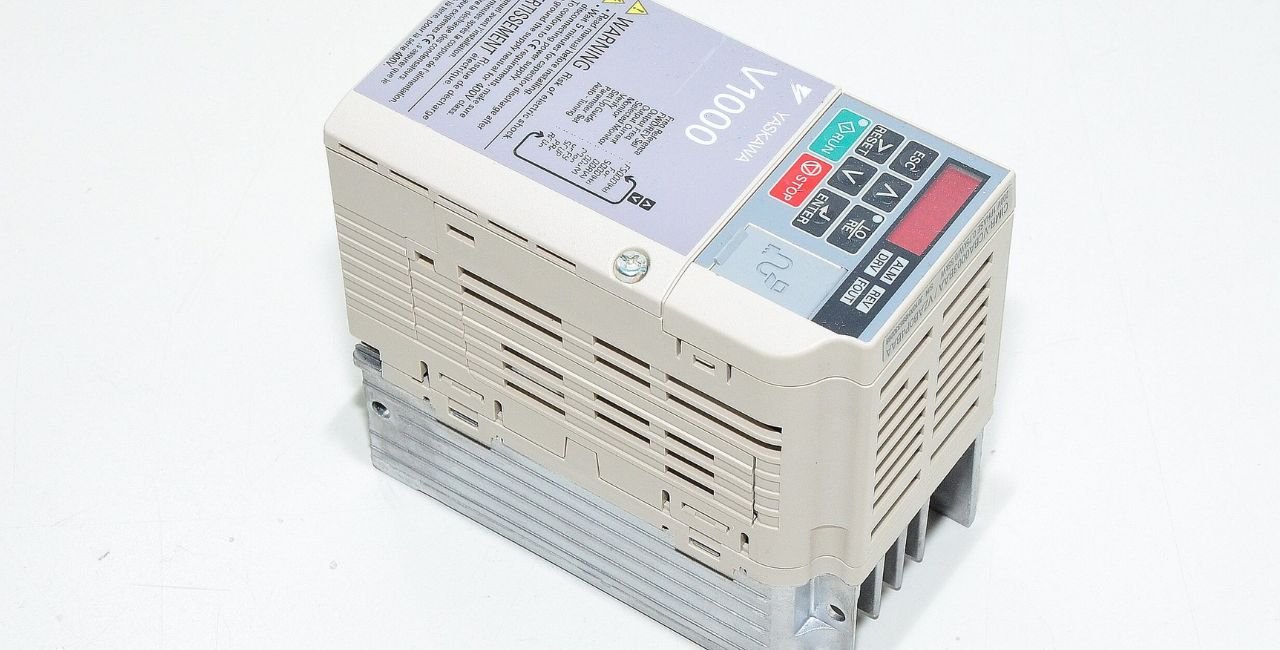
If you work with industrial automation, you know how vital reliable AC drives are. The yaskawa v1000 technical manual stands out as a key resource. It gives clear steps for setting up, running, and fixing the V1000 series drives. These drives handle motors from small to medium sizes with ease. In this guide, we dive deep into what the manual offers. We cover safety, setup, coding, fixes, and more. Our goal is to make complex info simple so you can use it right away. Whether you are new or experienced, this article helps you get the most from your V1000 drive.
Yaskawa, a leader in motion control, made the V1000 to fit many uses like fans, pumps, and conveyors. The manual, often found as a PDF, packs in details to keep things safe and smooth. We base this on official sources to ensure facts are right. Let’s start with the basics.
What Is the Yaskawa V1000 AC Drive?
The Yaskawa V1000 is a compact AC drive. It controls motor speed and torque. It works for single-phase or three-phase power. Models range from 0.2 kW to 18.5 kW. You see it in factories, HVAC systems, and machines.
Yaskawa started in 1915 in Japan. They focus on robots and drives. The V1000 came out around 2007. It replaced older models with better tech. Key wins include energy savings and easy setup. For example, it cuts power use by up to 20% in some cases, per industry tests.
The drive uses methods like V/f control. This keeps voltage and frequency in balance. It also has open loop vector for better torque. PM open loop vector suits permanent magnet motors. These features make it versatile.
Why does the yaskawa v1000 technical manual matter? It explains all this. Without it, you might miss key settings. That could lead to faults or poor performance. The manual has over 500 pages in some versions. It includes diagrams and tables. This helps users worldwide.
Key Features Highlighted in the Yaskawa V1000 Technical Manual
The manual lists many strong points. Here are the main ones:
- Compact Design: Fits in tight spaces. IP20 or NEMA Type 1 enclosures protect it.
- Control Modes: Choose V/f, open loop vector, or PM open loop vector. This fits different motors.
- Auto-Tuning: The drive tunes itself to the motor. This saves time and boosts accuracy.
- PID Control: Keeps processes steady, like flow or pressure.
- DriveWorksEZ: A tool for custom logic without extra hardware.
- Safety Features: Built-in safe torque off. This stops the motor safely.
- Communication Options: Supports Modbus, EtherNet/IP, and more.
One standout is the 1000 Hz output in special versions. This suits high-speed tasks. Normal models go to 400 Hz. The manual details how to set this.
Stats show V1000 drives last long. Fan life is about 10 years in good conditions. Capacitor life reaches 10 years too. These come from Yaskawa tests.
For SEO, terms like drive specs and fault codes appear often. They help searches find the manual fast.
Safety First: Guidelines from the Manual
Safety tops the list in the yaskawa v1000 technical manual. Always read this part first.
DANGER signs warn of shock risks. Wait 5 minutes after power off. This lets capacitors discharge.
WARNING notes cover sudden moves. Lock out power before work.
CAUTION is for burns or static. Use grounded tools.
NOTICE says no changes to the drive. This voids warranty.
Application tips include:
- Pick the right reactor for power issues.
- Ensure drive size matches motor load.
- Set up emergency stops.
The manual stresses qualified workers only. This keeps everyone safe.
In harsh spots, use enclosures. Avoid dust, oil, or vibes. Temp ranges from -10°C to 50°C for IP20 types.
Follow these, and you avoid accidents. It’s reassuring to know Yaskawa tests for standards like UL and CE.
Mechanical Installation Step-by-Step
Set up the drive right for long life. The manual gives clear steps.
- Check the Package: Look for damage. Match the model number, like CIMR-V2A0030A.
- Choose the Spot: Indoor, dry, no corrosives. Keep 30 mm sides, 100 mm top and bottom for air.
- Mount It: Upright on a wall. Use screws for the weight, from 1.3 to 6.6 lbs.
- Remove Covers: For wiring, take off front and bottom covers on IP20 models.
Dimensions vary. Small ones are 2.68 inches wide, 5.04 high. Big ones go to 6.69 wide.
For side-by-side, set L8-35 to 1. This allows 2 mm gaps.
In cold areas, watch for frost. Heat if needed.
This setup takes about 30 minutes. It ensures cooling fans work well.
Link to more resources on drives at UltraPanda for extra tips.
Electrical Installation Essentials
Wiring is key. Wrong wires cause faults.
Start with power off. Use lockout.
Main circuit: Connect R/L1, S/L2, T/L3 for three-phase. Skip T/L3 for single.
Output: U/T1, V/T2, W/T3 to motor.
Braking: B1, B2 for resistors if needed.
Control wires: S1 to S7 for inputs. MA, MB, MC for outputs.
Use shielded cables. This cuts noise.
Torques: 0.8 to 1.0 N·m for small screws.
Gauges: 14 AWG for most.
Separate power and control lines. Keep them 10 cm apart.
For EMC, add filters. The manual lists types like FS236xx.
Test ground: Less than 100 ohms for 200V.
This prevents shocks and noise.
Start-Up and Programming Basics
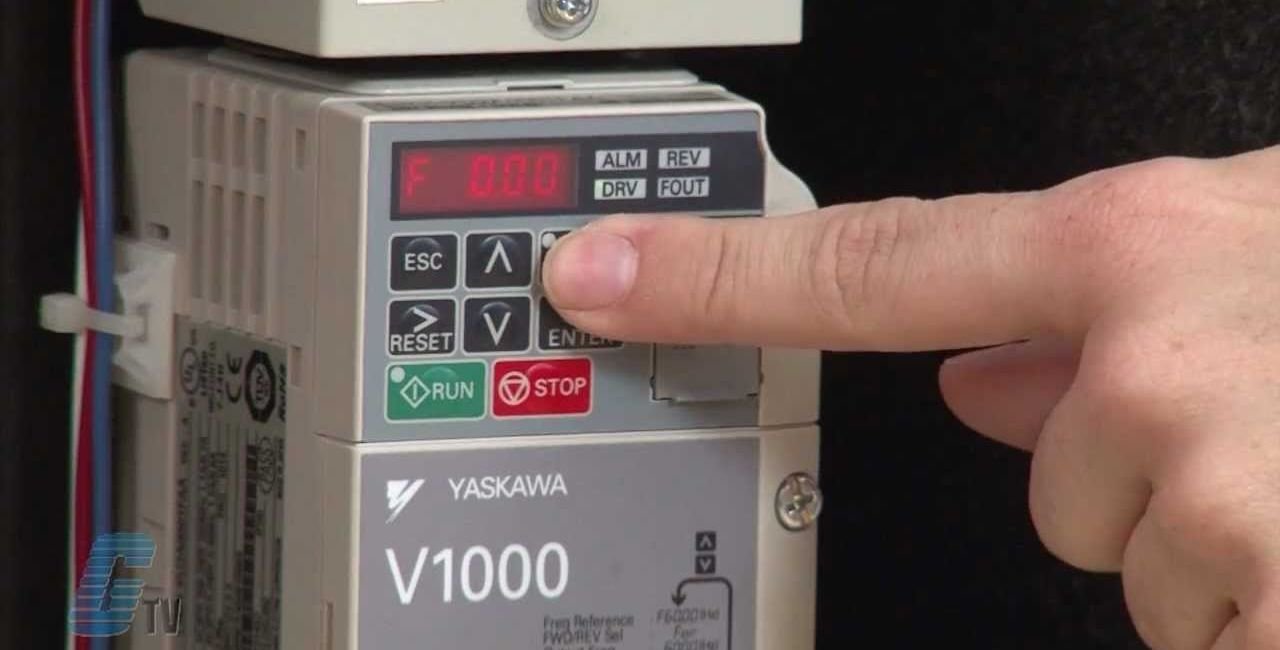
Power on after wiring. The LED operator shows up.
Keys: RUN, STOP, ENTER, ESC, arrows.
Modes: Drive for running, Programming for settings.
Set A1-02 for control: 0 for V/f, 2 for vector.
b1-01 picks freq source: 0 for keypad, 1 for analog.
Auto-tune: Run with no load. Set E2 params from motor plate.
Test run: Start at 6 Hz no load. Check rotation.
If wrong, swap two motor wires.
Backup params with o2-03.
This gets you running fast.
Deep Dive into Parameter Details
Parameters are the heart. Groups from A to U.
A Group – Initialization:
- A1-02: Control method. Default 0.
- A1-03: Reset to defaults. Use 2220 for 2-wire.
b Group – Application:
- b1-01: Freq ref source.
- b1-02: Run command source.
- b5 for PID: Set gains for steady control.
C Group – Tuning:
- C1-01: Accel time, 0 to 3600 seconds.
- C6-02: Carrier freq, 2 to 15 kHz.
d Group – References:
- d1-01 to 17: Multi-step speeds.
E Group – Motor:
- E1-04: Max freq, up to 400 Hz.
- E2-01: Motor current.
H Group – Terminals:
- H1-01 to 07: Input functions, like 40 for forward run.
L Group – Protection:
- L1-01: Overload mode.
- L3-02: Stall level, 150%.
n Group – Special Adjustments:
- n1-01: Hunting prevention.
o Group – Operator:
- o1-01: Display units.
U Group – Monitors:
- U1-01: Freq ref.
- U2 for faults.
Change one at a time. Test after.
For 1000 Hz version, max freq is 1000 Hz. Carrier max 7 kHz.
Use lists like this for quick finds.
Troubleshooting Common Issues
Faults happen. The manual helps fix them.
LED shows codes like oC for overcurrent.
Causes: Short circuit, bad tuning.
Fix: Check wires, retune.
oV: Overvoltage. Add braking resistor.
oL1: Overload. Reduce load or check params.
Uv: Undervoltage. Check power supply.
oH: Overheat. Clean fans.
Ground fault GF: Inspect motor insulation.
Operator errors oPE: Like oPE02 for out-of-range.
Reset: Press RESET or cycle power.
Use U2 for fault trace, U3 for history.
Tips:
- Log faults.
- Check params first.
- Call support if stuck.
Most fixes take under an hour.
Periodic Inspection and Maintenance
Keep the drive healthy.
Daily: Listen for odd noises. Check temp.
Every 3 months: Tighten screws. Clean dust.
Fans: Replace every 3 years. Monitor U4-03.
Capacitors: Last 10 years. U4-01 shows life.
IGBT: U4-02 for wear.
Alarm LT-1 when 90% life used.
Tools: Screwdriver, vacuum.
This extends life to 10+ years.
Peripheral Devices and Options
Add-ons enhance.
Breakers: MCCB for protection.
Reactors: For power quality.
Filters: EMC for noise.
Braking units: CDBR for stopping.
Remote operators: JVOP-180.
Comm cards: SI-P3 for Profibus.
Install per diagrams.
Ground all.
This fits custom needs.
Specifications Overview
Ratings: 200V class 0.2 to 18.5 kW, 0.8 to 69 A.
400V: 0.4 to 18.5 kW, 1.2 to 38 A.
Overload: 150% for 60 seconds heavy duty.
Accuracy: ±0.2% speed.
Environment: -10 to 50°C, 95% RH.
Standards: UL, CE.
Watt loss: Low, like 11.7 W for small.
Derate for high temp or altitude.
Use tables for exact.
Communications Setup
Connect to networks.
MEMOBUS/Modbus: RS-485, up to 115.2 kbps.
Set H5 params: Address, baud.
Errors: Like 01H for bad function.
Options: EtherNet/IP.
This links to PLCs.
Setup in 10 minutes.
Advanced Topics: 1000 Hz Version Insights
For high-speed, use 1000 Hz guide.
Differences: Fixed V/f, 150% overload.
Params: E1-04 to 1000 Hz.
Torque comp limits above 120 Hz.
Ideal for spindles.
FAQs on the Yaskawa V1000 Technical Manual
What is the yaskawa v1000 technical manual used for? It guides setup, operation, and fixes for the V1000 drive.
Where can I download the yaskawa v1000 technical manual? Find it on official sites like Yaskawa downloads.
How do I troubleshoot faults in the yaskawa v1000 technical manual? Check codes, causes, and solutions in the troubleshooting section.
What are key parameters in the yaskawa v1000 technical manual? Groups A to U cover control, tuning, and protection.
Is there a quick start in the yaskawa v1000 technical manual? Yes, plus a separate 1000 Hz guide here.
Conclusion
The yaskawa v1000 technical manual is your go-to for mastering this AC drive. It covers safety to specs, ensuring smooth runs. With proper setup and care, your V1000 lasts years, saving energy and time. Remember, always check official sources for updates.
What challenges have you faced with Yaskawa drives? Share in the comments!
References
- Yaskawa V1000 Technical Manual PDF – Official English version with full details on parameters and installation. Available at https://catalogo.yaskawa.com.br/Asset/Manual_Ingles_V1000.pdf. This source targets engineers and technicians needing comprehensive guides.
- V1000 1000Hz Quick Start Guide – Focuses on high-frequency setups for specialized users like in high-speed machinery. Found at https://www.cospa.ru/upload/iblock/0ea/V1000_1000Hz_QSG_EN_TOEPC71060646A_0_0.pdf. Aimed at quick implementers in industrial settings.
- Yaskawa Official Download Page – Provides access to the manual for authenticated users, emphasizing authenticity for professionals in automation.
